

WPGeoBuddy 2.0.0: Manage Your GeoDirectory Website With AI
WP Gobuddy 2.0.0 adds Model Context Protocol (MCP) support to GeoDirectory websites, letting you connect AI agents like Claude AI, Cursor AI, ChatGPT, Gemini, and VS Code local agents to manage listings, reviews, and settings using plain chat commands instead of the WordPress dashboard.
What Is WPGeoBuddy and How Does It Work With GeoDirectory?
Managing a WordPress directory site usually means clicking through dozens of admin screens just to check a listing or fix a review. GeoDirectory site owners lose hours to slow dashboards and repetitive manual tasks.
WP Gobuddy 2.0.0 solves this by adding Model Context Protocol (MCP) support, which connects local AI agents directly to GeoDirectory data so you can pull information or change site settings using chat commands.
WPGeoBuddy works as an extra layer on top of GeoDirectory rather than a replacement — it gives you new ways to manage the plugin instead of forcing you through the standard multi-page dashboard. Version 2.0.0 takes an API-driven approach, letting your AI tool talk directly to your database so site management feels more like a conversation.
What Is New in GeoBuddy 2.0.0?
Version 2.0.0 includes three major additions:
- Additional listing and form tools, including custom fields, a multi-step form, and templates.
- GeoBuddy AI management for connecting a local AI agent to GeoDirectory.
- A floating action bar for improving actions on individual listing pages.
Connect GeoDirectory to a Local AI Agent With MCP
The most significant addition is the GeoDirectory AI agent integration. GeoBuddy connects through an MCP server, allowing a local AI client to communicate with your GeoDirectory data.
This means you can use AI tools you already work with, including:
- Claude Desktop
- Cursor AI
- VS Code
- ChatGPT
- Gemini
- Other MCP-compatible local AI clients
The free GeoBuddy AI version provides 14 tools for retrieving data. These are read-access tools, so you can ask your AI agent for information stored in the directory.
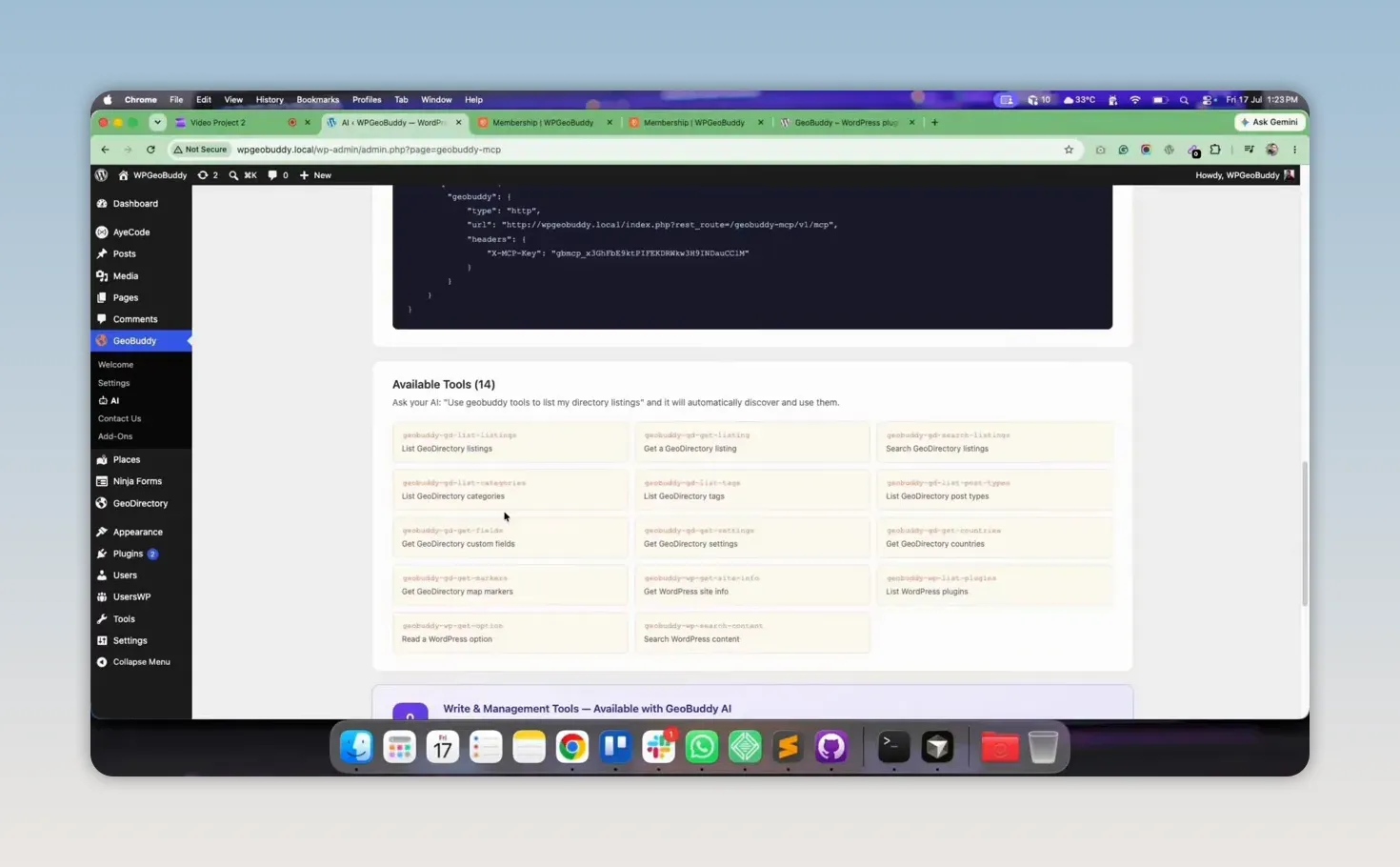
Free AI Tools: Retrieve Information From Your Directory
With read access, you can ask questions in natural language and retrieve information from your GeoDirectory website without manually searching through multiple dashboard screens.
For example, you can ask your AI agent to:
- List all GeoDirectory listings
- Search for a particular listing
- Retrieve listing details
- Check WordPress site information
- Access directory data from your local AI environment
The free toolset is designed for getting data. It gives you a practical way to inspect and search your site information through your preferred AI client.
Step-by-Step: Setting Up WPGeobuddy MCP in Cursor AI
- Download Cursor AI — Go to cursor.com and download the Cursor desktop app.
- Open MCP settings — In Cursor, open Settings and locate the custom MCP section.
- Paste the configuration code — Copy the configuration code provided by WP Gobuddy and paste it into the custom MCP field.
- Save your settings — Once saved, all 14 available tools activate automatically.
- Confirm the connection — Your local WordPress site is now linked to your AI agent and ready for chat-based commands.
Conversational Commands You Can Use
Once connected, you can manage your directory through chat instead of the dashboard.
- List your listings — Typing a request like “Please list the geo directory listings” prompts the AI to scan your site and report how many listings are published, along with the list itself.
- Search for a specific listing — In a test search for a “village whiskey” listing, the AI returned the ID, address, coordinates, and URL within seconds — no manual filtering through the WordPress admin required.
- Run a site health check — Asking for “WordPress site information” prompts the AI to share your site name, version, admin email, and time zone, giving you a fast way to verify settings without opening the General Settings page.
What You Get With the Pro Add-On
The Pro version turns the AI from a read-only researcher into a full admin, adding write access so you can tell it to create or update a listing without opening every post individually.
Listing management – You can create, update, and change listing status (publish/draft/pending); can trash a listing but never permanently delete it.
Review moderation: Pro users can moderate reviews through chat — approving a review, marking one as spam, or writing a reply to a customer directly, saving hours of manual work.
Settings management: You can also adjust core GeoDirectory settings by chat command, with the AI handling the configuration in the background.
GeoBuddy AI Pro: Write Access for Full Management
The free GeoBuddy AI tools focus on retrieving data. If you need to make changes, the GeoBuddy AI Pro add-on provides write access.
With Pro access, you can manage GeoDirectory content through your local AI agent, including the ability to:
- Create listings
- Update existing listings
- Delete listings
- Manage listing data
- Manage categories and custom fields
- Moderate reviews
- Reply to reviews
- Approve reviews
- Mark reviews as spam
- Manage GeoDirectory settings
This is where AI can save substantial time on repetitive directory administration. Instead of opening individual listings and settings screens one at a time, you can issue clear requests through your connected local AI tool while keeping control over the work being done.

Membership and Add-On Access
GeoBuddy AI is available as a single-site add-on and through the WPGeoBuddy membership. The membership shown is priced at $99 per year and includes 10 available premium add-ons, along with future add-ons released during the membership period.
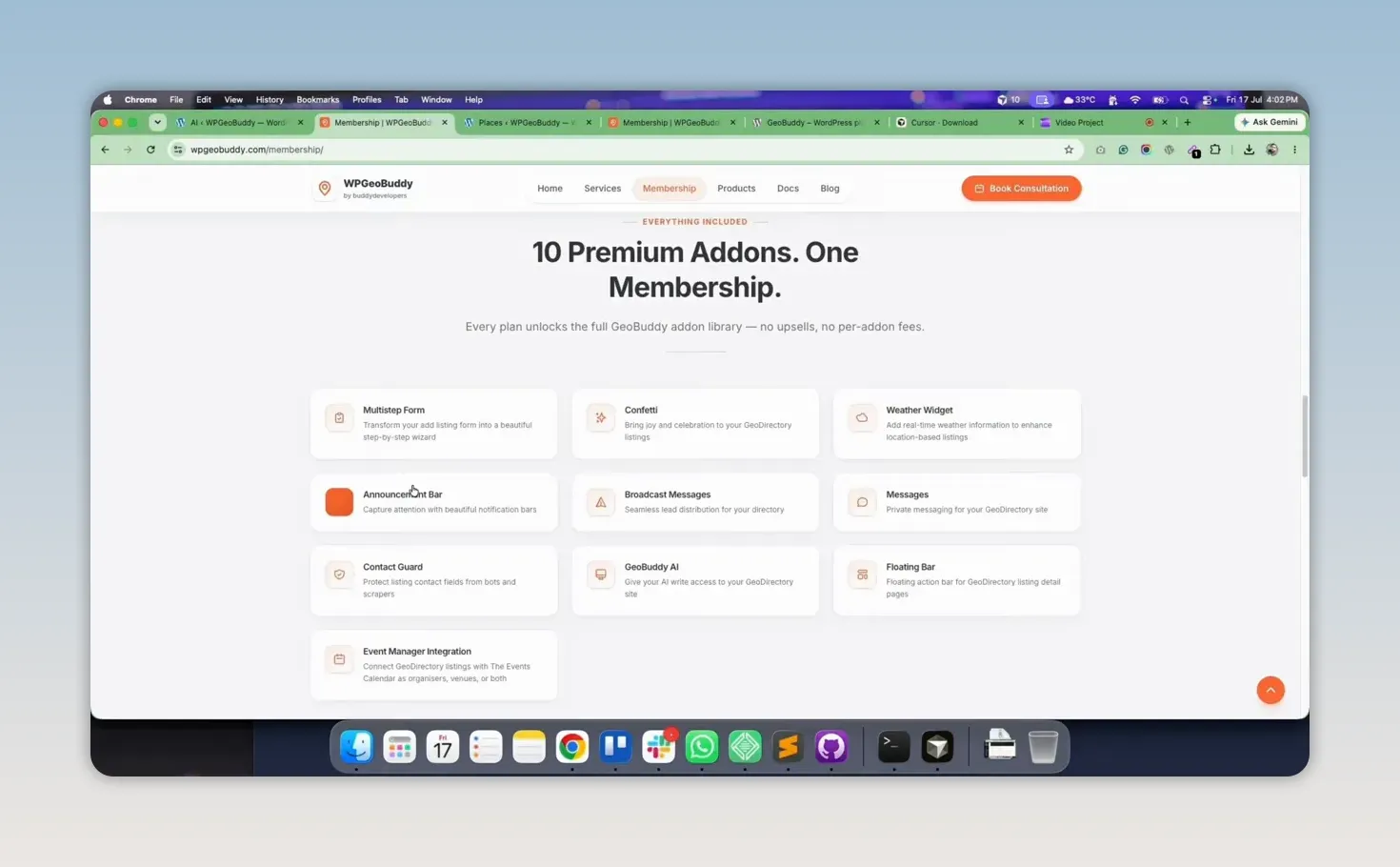
For directory owners who need more than one feature, the membership provides access to the broader GeoBuddy add-on collection rather than requiring separate purchases for each tool.
If you get stuck, the team offers a free 30-minute consultation with a GeoDirectory expert to help with setup or AI tool configuration.
You can watch full video
Frequently Asked Questions
What is WP Gobuddy 2.0.0?
It’s a WordPress add-on for GeoDirectory that adds MCP (Model Context Protocol) support, letting local AI agents read and manage your directory data through chat commands instead of the standard dashboard.
Which AI tools work with GeoBuddy AI?
Cursor AI, Claude AI, ChatGPT, Gemini, and VS Code local agents are all supported.
Does the free version let AI edit my site?
No. The free MCP server is read-only, so the AI can retrieve data but cannot make changes. Write access (creating, editing, or deleting listings) requires the Pro tier.
Can AI moderate reviews on my GeoDirectory site?
Yes, with the Pro add-on. You can approve, mark as spam, or reply to reviews through chat commands.
How many MCP tools does GeoBuddy include?
14 tools activate once the MCP configuration is set up and saved.
Need expert help?
Build your GeoDirectory site with confidence
Get a free consultation from our GeoDirectory specialists.


